Most AI projects don't fail because the model isn't smart enough. They fail because of everything around the model.
At Cleverse, we do forward-deployed engineering. We embed engineers inside our customers' organizations and build with AI on their real work, not a cleaned-up version of it. Most of what's in this post, we learned by getting it wrong first.
In this post, we go through:
- Why the model is rarely the real bottleneck
- The difference between AI Rebuilding and retrofitting AI into an existing process
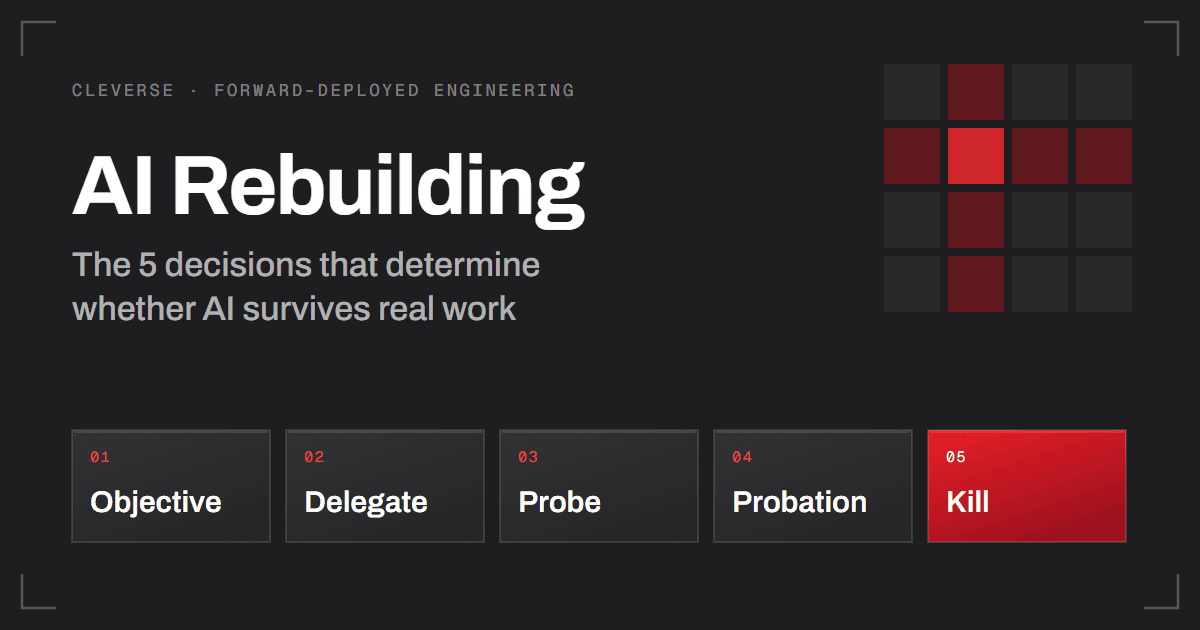
- The five decisions that determine whether AI survives real work: Objective, Delegate, Probe, Probation, and Kill
- How to know when you're done, and the two traps that catch teams at the finish line
- What we're still unsure about
The Model Is Rarely The Bottleneck
When an AI project stalls, the instinct is to blame the model. Wait for the next release. Switch providers. Tune the prompt one more time.
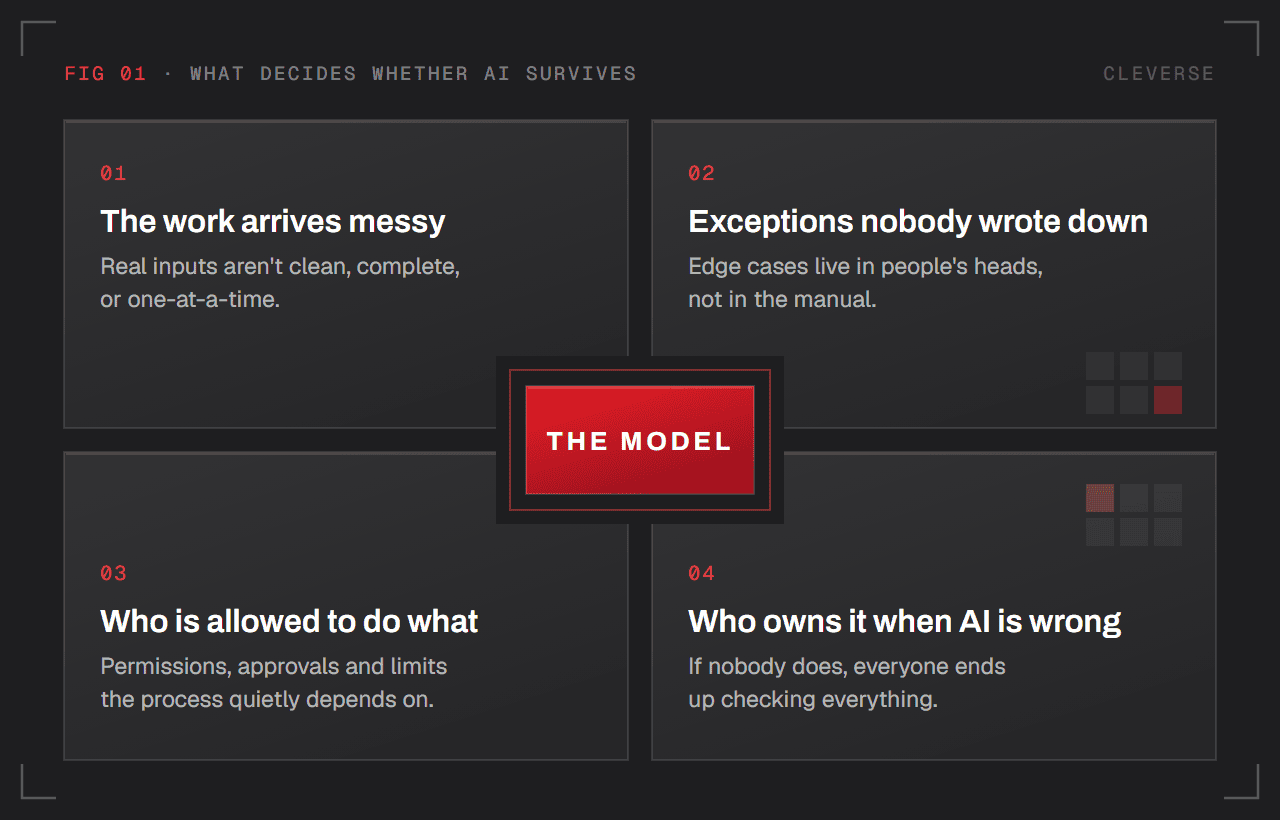
In our experience, what decides whether AI survives in production is rarely the model. It's four things that sit around it:
- The work arrives messy. Real inputs aren't clean, complete, or one-at-a-time.
- Exceptions nobody wrote down. Every process has edge cases that live in people's heads, not in the manual.
- Who is allowed to do what. The permissions, approvals, and limits the process quietly depends on.
- Who owns it when the AI is wrong. If nobody does, everyone ends up checking everything.
To be fair, there are problems where the model really is the bottleneck. If that's your situation, this framework will help you less. But that set of problems is smaller than most teams think.
The Demo Gap
Take a system that reads insurance claims. It passes the demo beautifully. Then it breaks the moment it touches real work.
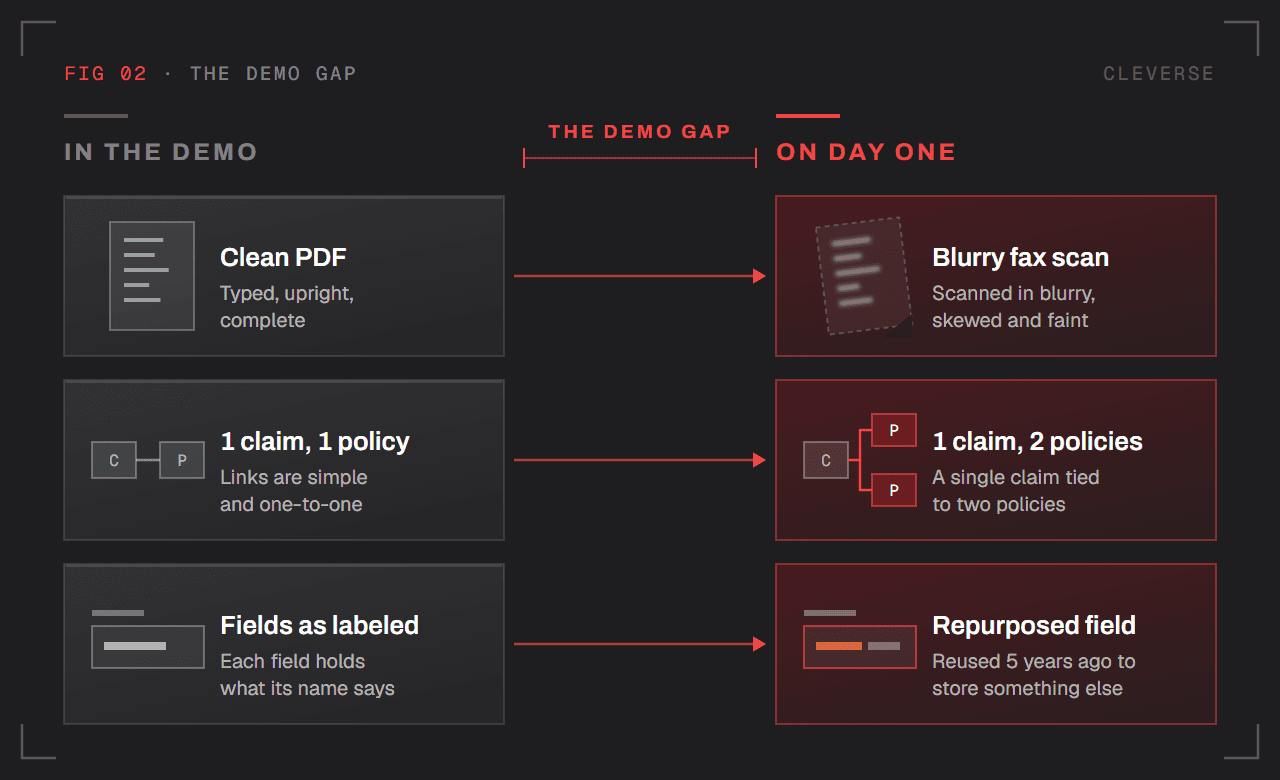
Not because the model can't read. Because real work looks like this:
- Faxes that were scanned in blurry
- A single claim tied to two different policies
- A field in the core system that someone started using to store something else five years ago
None of that shows up in a demo. All of it shows up on day one. We call this the Demo Gap: the distance between how work looks in a sample file and how it actually arrives. Most AI projects live or die inside that gap.
AI Rebuilding ≠ Retrofitting AI
There are two ways to bring AI into a workflow:
- Retrofitting: Every existing step stays. You hand one of them to AI. The work gets a little faster.
- Rebuilding: You redesign how the work gets done, with AI at the core.
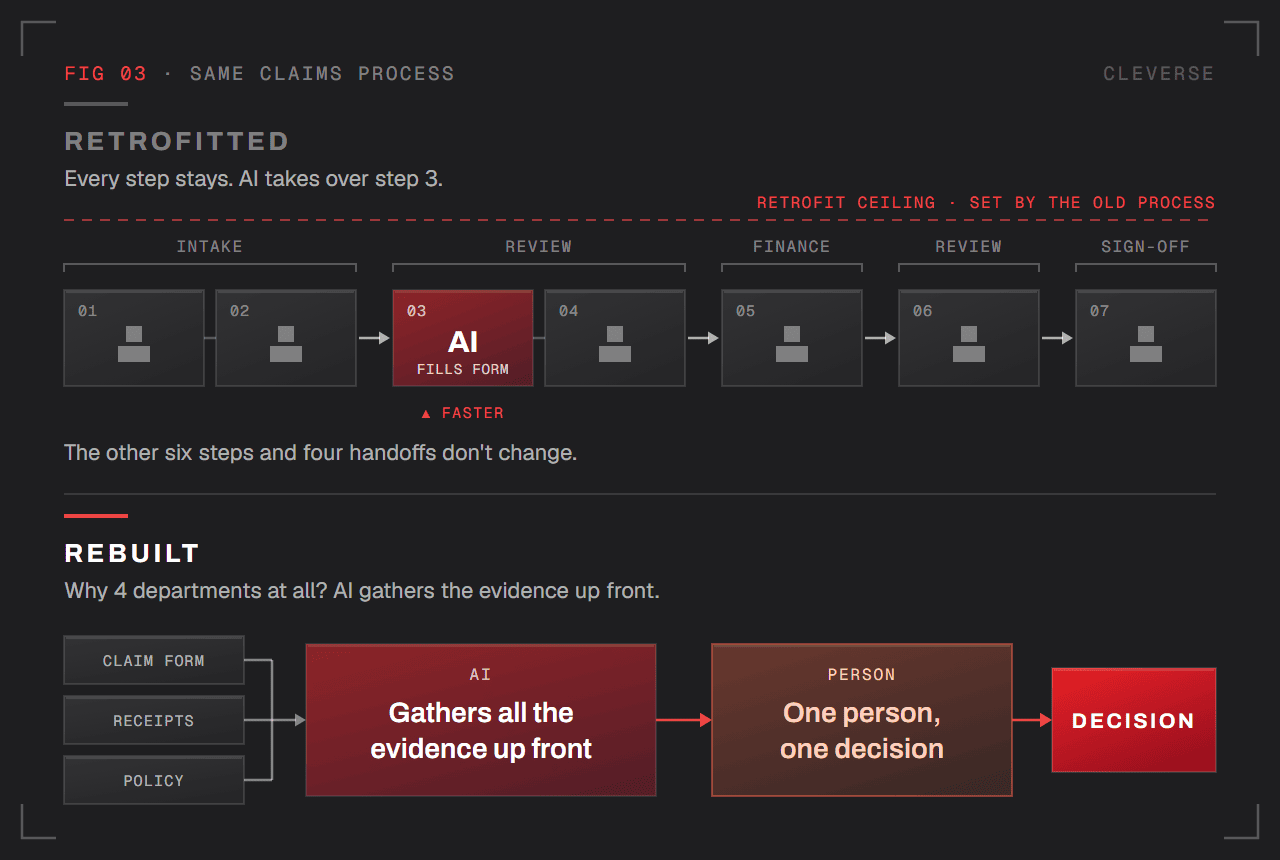
The problem with retrofitting isn't that it doesn't work. It's that the ceiling was set before you wrote a single line of code. The old process defines the maximum value AI can ever create. We think of this as the Retrofit Ceiling.
Take a claims process with 7 steps, handed off across 4 departments.
- Retrofitted: AI fills out the form in step 3 instead of a person. Step 3 gets faster. The other six steps and four handoffs don't change.
- Rebuilt: You ask a different question. Why does this need to pass through 4 departments at all? If AI gathers all the evidence up front, maybe you only need one person making one decision.
The Five Decisions
Every deployment we've done comes down to five decisions:
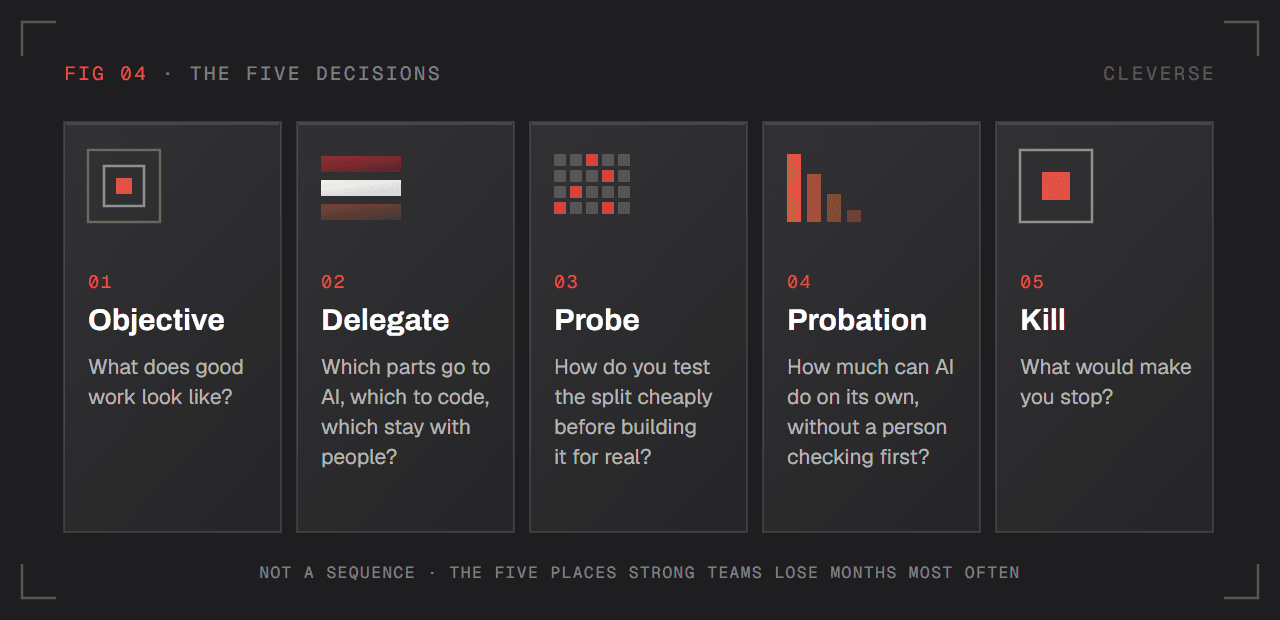
| Decision | What you're deciding |
| Objective | What does good work look like? |
| Delegate | Which parts go to AI, which to code, which stay with people? |
| Probe | How do you test that split cheaply before building it for real? |
| Probation | How much can AI do on its own, without a person checking first? |
| Kill | What would make you stop? |
Two caveats. This isn't a process you run in order, and it doesn't cover everything. These are simply the five places where we've seen strong teams, including ours, lose months most often.
Decision 1: Objective — Agree On What "Good" Looks Like
Before anyone builds anything, ask the people doing the work today one question: How do you know when this was done well? Write the answer down in their words, not yours.
Four rules make this work:
- The answer has to be checkable. "High accuracy" doesn't count. If you can't verify it on a single case, it isn't an objective.
- Ask about outcomes, not steps. Ask "how do you do it?" and you get the old process back. Then you copy it straight into your plan, which is exactly what this decision exists to prevent.
- Ask more than one person. If three veterans give you three different answers, that's the most valuable data you'll get all week. Exceptions hide inside those disagreements.
- Don't average the answers. The disagreement is the signal. Smooth it out and you throw away the exceptions you'll trip over later.
Example: The manual says a good claim means "all 5 required documents are complete." But a senior reviewer tells you that, in practice, they only look at two things:
- Was the admission date within the period the policy was active?
- Does the diagnosis match one of the policy's exclusions?
Both are clear and checkable. Neither was ever in the manual.
That's the gap between documented work and real work. The manual describes the process. The people know the objective.
Decision 2: Delegate — Split The Work Between AI, Code, And People
Most disappointing AI projects make the same mistake. They hand the entire job to the model.
The fix is to be deliberate about who does what:
| Who | What kind of work |
| AI | Work that takes judgment: reading unclear input, choosing between several reasonable paths, gathering evidence, deciding whether it knows enough to move on |
| Plain code | Work that must never be wrong: permissions, input validation, limits and thresholds, audit logs, anything that can't be undone |
| People | Cases where being wrong is expensive, or decisions that genuinely belong to them |
Three principles fall out of this:
- Irreversible actions belong to code. Code makes the call and code enforces the wait for a person. An instruction in a prompt is not a permission system.
- Split by kind of case. The right split for typed receipts can be the wrong split for handwritten ones.
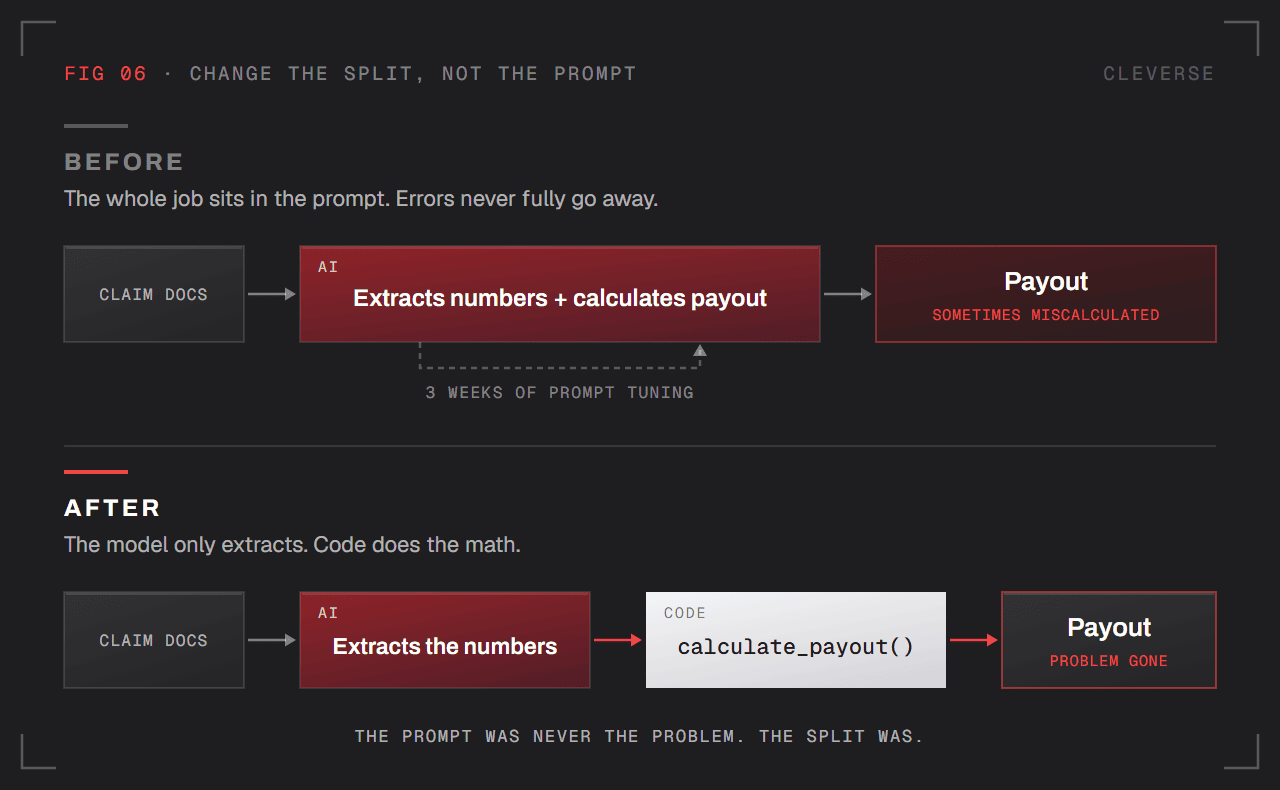
- When AI gets something wrong, change the first question. Not "how do we fix the prompt?" but "should the model have been doing this in the first place?"
That last one is where teams lose the most time. They spend weeks tuning prompts for work that code should have caught and routed somewhere else.
Example: The AI occasionally miscalculates claim payouts. The team spends 3 weeks tuning the prompt and the errors never fully go away. Then they move the calculation into code and let the AI only extract the numbers from the documents. The problem disappears immediately.
The prompt was never the problem. The split was.
Decision 3: Probe — Test The Split Cheaply Before You Build
Your split is a guess. Testing a guess is cheap. Assuming it's right is expensive.
The fastest probe usually isn't software:
- Have a person do the AI's part by hand for an afternoon
- Paste 20 real cases into a chat window
- Drop the output into the current workflow and see whether the next person in line can actually use it
Three rules for a good probe:
- Use your worst cases. Clean sample files make every plan look good. They're tidy, complete, and arrive one at a time. Real work doesn't.
- Build it to be thrown away. Otherwise, a month from now someone will be defending it.
- Know what it can't tell you. A probe tells you whether AI can make this judgment. It tells you nothing about latency, integrations, permissions, or fixing bad data. A passing probe means the plan is worth building. It doesn't mean the system will work.
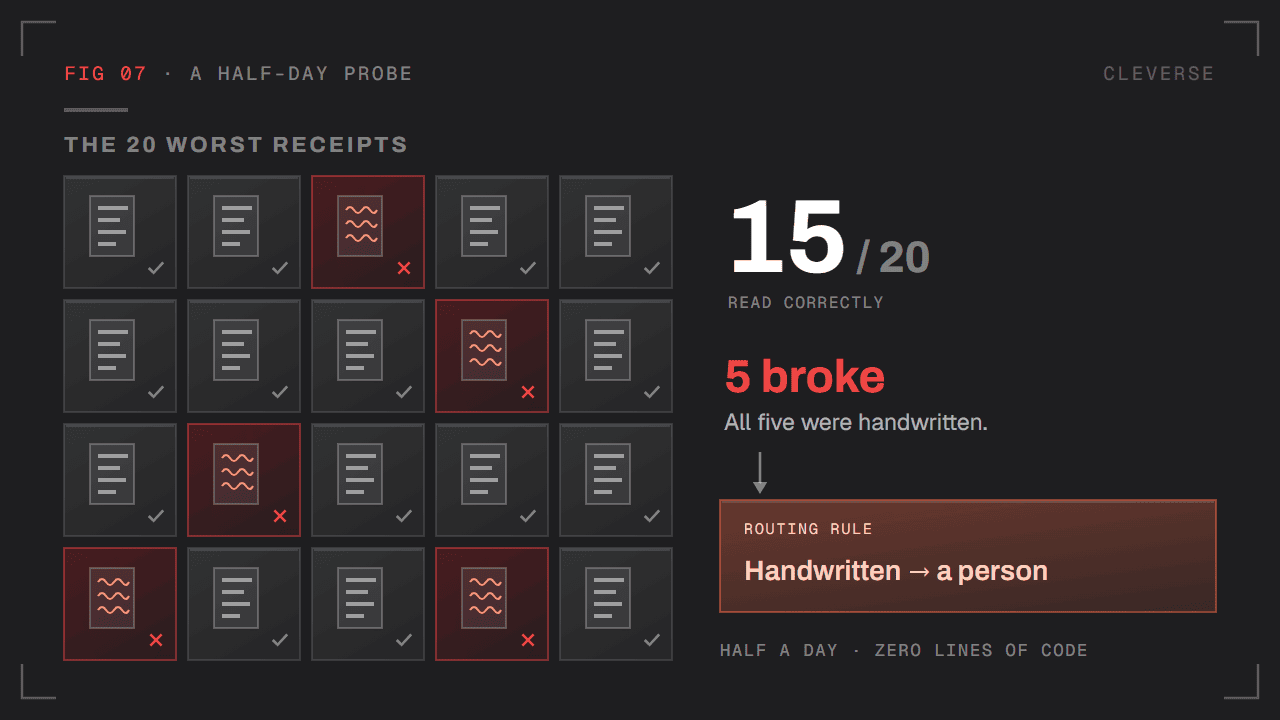
Example: The question is "Can AI pull line items out of scanned medical receipts?" Pick the 20 worst receipts you can find and paste them into a chat. Half a day of work.
Result: 15 correct. The other 5 broke, and all 5 were handwritten.
Now you know handwritten receipts go to a person. You learned it without writing a single line of code.
Decision 4: Probation — People Review Until AI Proves They Don't Need To
Treat AI like a talented new hire. Give it small, clearly defined work. Have someone review it. Expand its responsibility only for the kinds of case where it has proven itself.
This is easy to confuse with Delegate, so let's be explicit:
- Delegate = which parts of the work AI does
- Probation = how much of that part AI does on its own, without a person checking first
You can split the work perfectly and still hand AI authority too early.
What earns AI more responsibility
A month of good results is not enough.
The bar is this: mistakes that have happened before can no longer happen again. Because code catches them. Because a test blocks them. Or because that kind of case now gets routed somewhere else.
Prompt fixes don't count. They don't survive a model change or a strange new case. We call these Prompt Patches: they make the symptom go away without making the failure impossible.
How to find the mistakes
The error analysis approach is the best method we've found:
- Open 100 real cases
- For every case that went wrong, write one simple sentence describing what happened
- Group the sentences and count each group
- Fix the biggest group first
Most teams skip this step. Without it, Probation has nothing underneath it. You're promoting the AI on a feeling.
Review volume has to visibly drop
The whole point of Probation is to graduate. AI that takes on 90% of the work but creates expensive cleanup is worse than AI that takes on 60% cleanly.
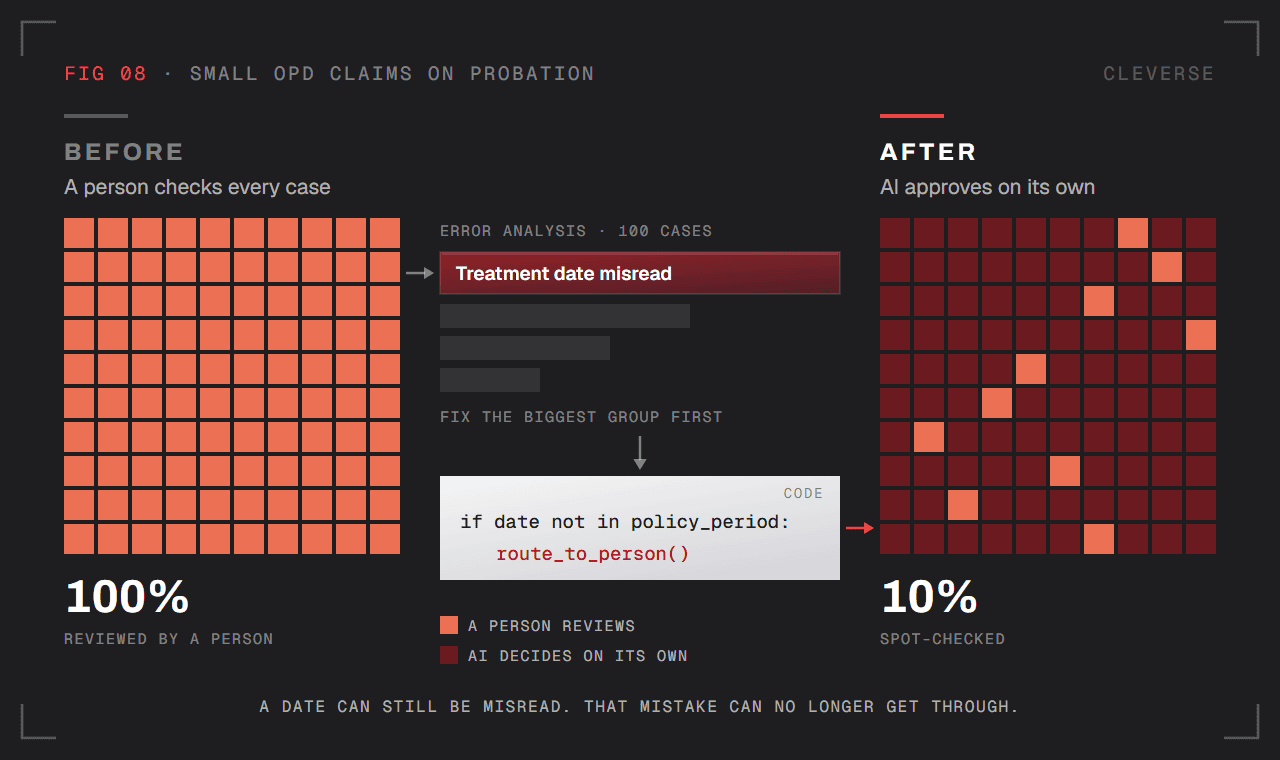
Example: Start with one kind of case: small outpatient (OPD) claims. AI drafts the decision, and a person checks every single one. Review volume: 100%.
Error analysis on 100 cases shows the biggest group of mistakes: AI misreads the treatment date. Some claims get approved even though the treatment happened outside the policy period.
The team doesn't fix this in the prompt. They write code that checks one thing: is the treatment date inside the policy period? If not, the case goes straight to a person. The model can still misread a date, but that mistake can no longer get through.
Now AI can approve small outpatient claims on its own, and review drops from 100% to a 10% spot-check. That drop is the proof Probation is working.
Decision 5: Kill — Write Down What Would Make You Stop, Before You Start
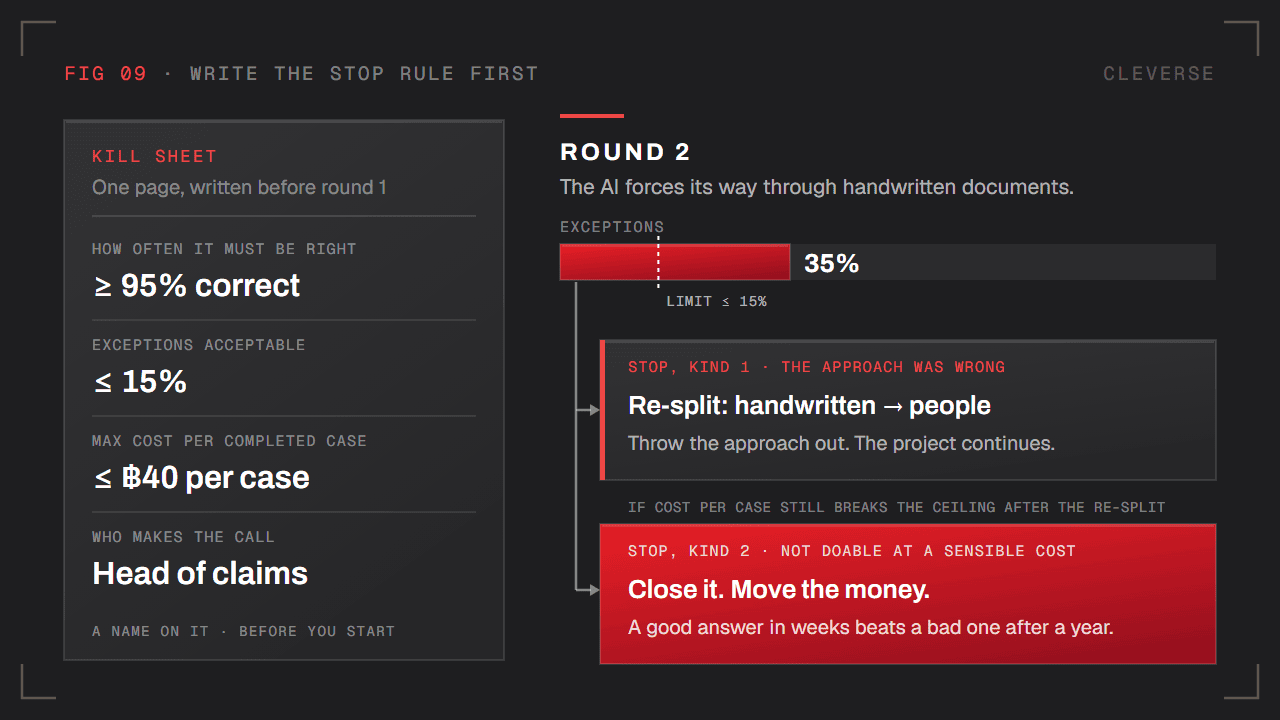
Before the first round, write one short page that answers four questions:
- How often does it need to be right?
- How many exceptions are acceptable?
- What's the maximum cost per completed case?
- Who, by name, makes the call?
If you write this after you start, you don't have it. The project turns into endless tuning, and nobody has the authority to say stop.
The uncomfortable baseline
The natural benchmark is "how good are people at this today?" Almost nobody has measured it.
You should. It's often the first time the organization actually knows. But treat it as separate work, and be ready: the answer can be uncomfortable in either direction.
Two kinds of stopping
Not every stop is a failure.
- The approach was wrong. Throw it out. Re-split the work using what you just learned. The project continues.
- The work can't be done well enough at a cost that makes sense. Close it. Move the money to the next project. A good answer in a few weeks beats a bad answer after a year.
Example: Before starting, the team writes down: ≥95% correct, ≤15% exceptions, ≤฿40 (about a dollar) per case, decided by the head of claims.
In round 2, exceptions jump to 35%. The AI is forcing its way through handwritten documents.
That's the first kind of stop. Re-split: handwritten documents go to people. Keep going. But if cost per case still breaks the ceiling after the re-split, that's the second kind. Close it.
How Many Rounds? Wrong Question
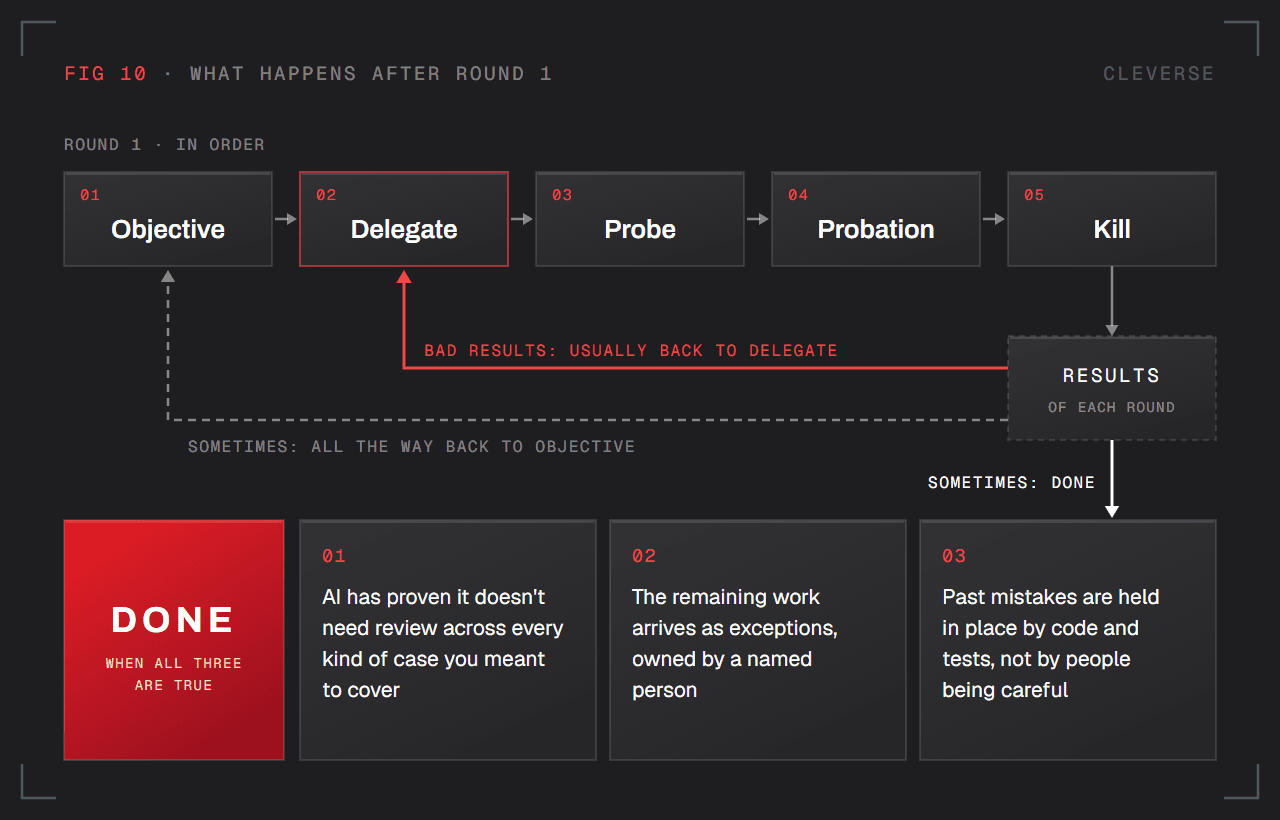
The order of the five decisions only applies to the first round. After that, it stops being a sequence.
- When results are bad, you usually go back to Delegate
- Sometimes you have to go all the way back to Objective
- Sometimes the work is done
Teams love to ask how many rounds this takes. The better question is: what makes you stop? The answer lives in Probation.
You're done when all three are true:
- AI has proven it doesn't need review across every kind of case you meant to cover
- The remaining work arrives as exceptions, owned by a named person
- Past mistakes are held in place by code and tests, not by people being careful
Two traps at the finish line
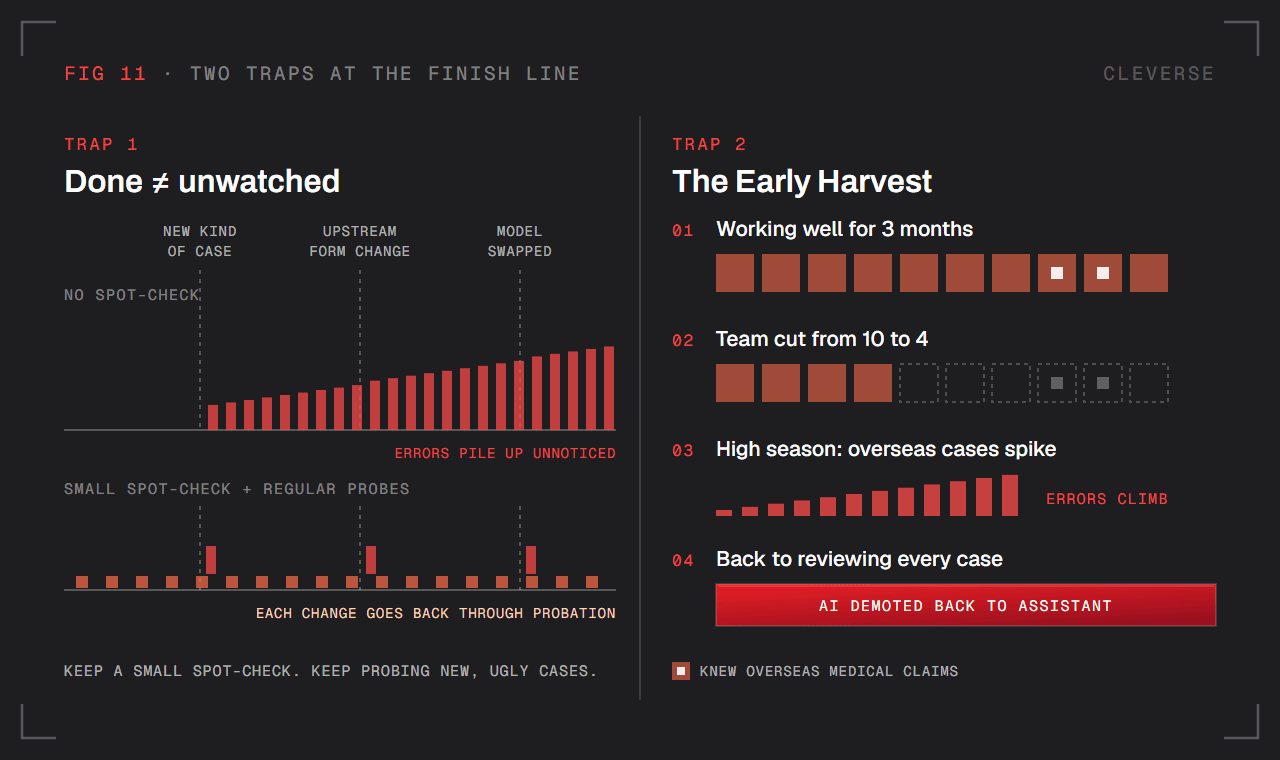
Trap 1: Fully Autonomous. Real work keeps changing: a new kind of case shows up, a form changes upstream, the model gets swapped. Nobody notices until the errors have already piled up. Done doesn't mean unwatched. Keep a small spot-check, and keep probing new and ugly cases on a regular schedule, so anything new goes back through Probation.
Trap 2: The Early Harvest. You cut headcount before the strange cases are handled, and you lose the people who understood them. Months later, quality starts to slide, and AI gets demoted back to an assistant.
Example (Trap 2): A claims system has worked well for 3 months. The company cuts the team from 10 people to 4. The people who knew overseas medical claims are among those who leave. When overseas cases spike in high season, nobody can review them properly and errors climb. Eventually, people go back to reviewing every case, right where they started.
Reliability Is Built, Not Prompted
If there's one idea to take from this post, it's this:
AI reliability has to be built into the system (code, tests, and case routing) one kind of case at a time. It can't live in a prompt, or in the good intentions of whoever is doing the review.
The models will keep getting better. That's the part you don't control. What you do control is everything around the model: what good looks like, who does what, how cheaply you test, how authority is earned, and when you stop. That's where AI projects actually succeed or fail.
Cleverse does forward-deployed engineering: our engineers work inside the customer's environment, on the customer's real work.


